Flashlight Game: Lights Out
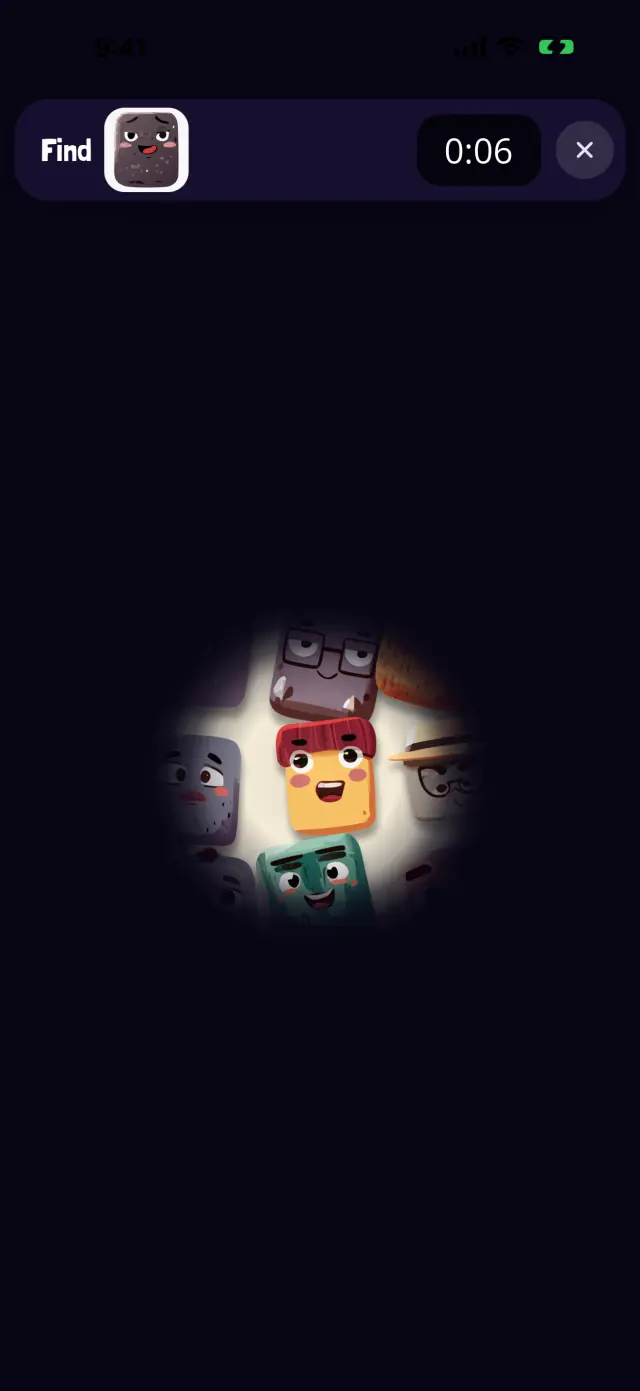
Someone turned the lights off, and the Oopsies are hiding in the dark. All you have is a flashlight. Lights Out is a world of Oopsies, a free seek-and-find game for iPhone and iPad, and you can play two of its levels right here.
 Drag to move the flashlight 0:00
 Free, nothing to download. Tap Find to start: the timer runs, and a wrong Oopsie adds 10 seconds, like in the app.
How the flashlight game works
Oopsies fill the whole screen, but you can only see the few inside your beam of light. The start screen shows who you're looking for. Then sweep the light around until you find them.
- Drag your finger to move the flashlight (on this page, a mouse works too). The beam stays a little above your finger, so your finger never hides what you're looking for.
- Tap an Oopsie in the light to check it. The right one wins the level; a wrong one costs 10 seconds.
- Tap in the dark and the light jumps there. No penalty: you can't tap what you can't see.
- The Oopsie you need is never in the light when the level starts. There's always something to look for.
- Levels get trickier: more Oopsies, lookalikes, a smaller beam. At level 5 the battery runs low and the flashlight flickers now and then. Later, Oopsies turn every which way, and in the last level the light slowly shrinks.
What Lights Out trains
A flashlight forces you to look at a small part of the scene at a time. To find the Oopsie fast, you need a plan: sweep the light in lines, like mowing a lawn. That's visual scanning, and the flashlight makes it visible, which is why it's a favorite with teachers.
You also have to remember where you've already been and what you saw there. That's visual memory, working quietly in the background.
- Main skill Visual scanning
- Also Visual memory
- All skills Visual skills, explained
Tips for parents
- Show the lawnmower trick. Left to right, then down a bit, then right to left. Kids who sweep in lines find the Oopsie much faster than kids who zigzag.
- Play it in real life. Hide a few toys in a dark room and hunt them with a real flashlight. Then swap: your child hides, you search.
- Not scary, promise. The dark is cosy, not spooky: no monsters, no jump scares. The light comes back on as soon as the Oopsie is found.
- Flicker levels need patience. When the battery runs low, encourage your child to wait for the light rather than tap in a hurry.
The Lights Out cards
Each level of Lights Out frees one Oopsie, and every Oopsie you free becomes a collector card in the app. Here are the cards of this world, the same as in the game. Point at a card, or drag it, to tilt it.
Good to know
- Free, for real. No ads, no in-app purchases, nothing to unlock with money.
- Rated 4+ on the App Store. Simple enough for preschoolers, tricky enough for grown-ups in later levels.
- iPhone, iPad, Mac (M1 or later) and Apple Vision Pro.
- Works in airplane mode. Levels play offline; progress and leaderboard times sync when you're back online.
- Rather no timer? The stopwatch button on the app's home screen hides the timer and the "+10 s" for a wrong Oopsie.
More worlds to play
Every world in Oopsies bends the rules a different way. Each one has a level you can play right here.
- Frosti Floops Seek and find game
- Starry Zoooooop Space seek and find game
- Odd Ones Odd one out game
- Tiny Titans Big and small game
- Double Trouble Find the same game
- Shadow Show Shadow matching game
- Peekaboo Guess the picture game
- Family Reunion Sorting game
- Foggy Window Wipe to reveal game
- Whoosh! Moving objects game
- Bubble Pop Bubble pop game
All the worlds on one page: Oopsies games. Looking for something calmer or for younger kids? See games for preschoolers and games with no ads.
Page updated on .